NOTE: Spirea Studio is currently in Alpha development. Features and output may not be fully representative of the launch version coming soon. For more information please contact us at iq.support@thisisgain.com.
How do I generate a new creative?
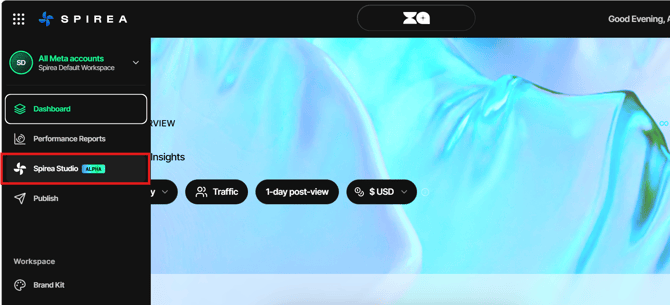
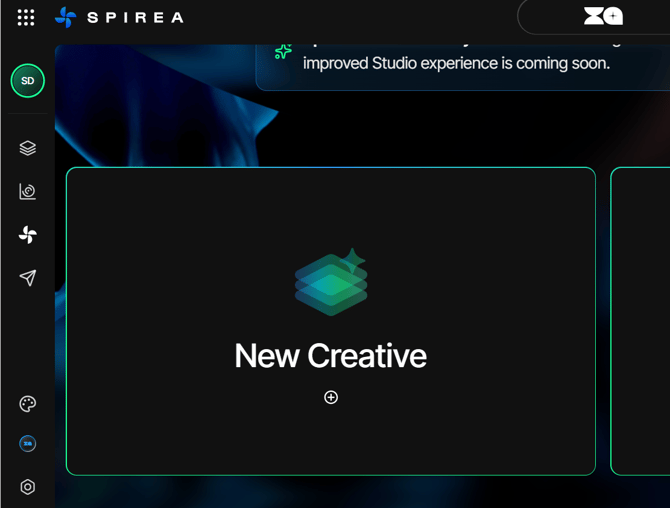
- Open Spirea Studio and choose New Creative.
- Write a Prompt describing the subject, setting and feeling you want.
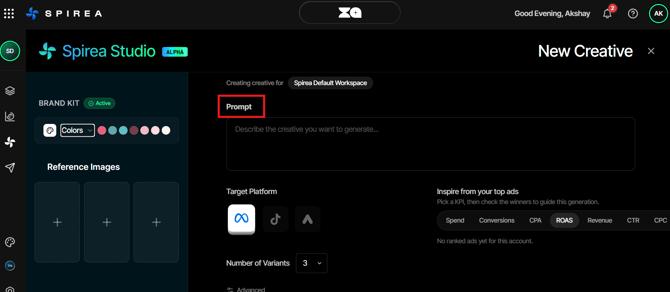
- Optionally add up to three Reference Images, each up to 5 MB.
- Choose a Target Platform.
- Set Number of Variants from 1 to 10. The default is 3.
- Open Advanced if you want to turn headline, body or CTA text groups on or off.
- Check the token cost on Generate and click Generate.
The Brand Kit already handles colour, tone and compliance, so focus the prompt on the creative subject, setting and feeling rather than repeating brand rules.
How do I inspire a generation from my top ads?
- In Inspire from your top ads, choose a KPI: Spend, Conversions, CPA, ROAS, Revenue, CTR, CPC or CPM.
- Review the winners Spirea lists for that metric.
- Select the ads you want to guide the generation.
A prompt describes what you imagine. Selecting top ads tells Spirea what has actually worked in the account for the metric you care about.
Which aspect ratios does each platform generate?
- Meta: 1:1, 4:5, 9:16 and 1.91:1.
- TikTok: 9:16.
- Google: 1:1 and 1.91:1.
How many variants should I generate?
Three to five variants is a sensible default. Generate more only when you are deliberately exploring a new direction, because each variant is produced in every aspect ratio for the selected platform and consumes tokens per generated image.